
Obsidian is free. Obsidian Sync is not — it is $4 to $10 a month depending on the tier, which is a strange thing to pay for an app built on the promise that your notes are just plain files on your own disk.
Because they are just files, there are half a dozen ways to keep them in step across devices without paying. All of them work. Most of them will eventually corrupt something if you set them up carelessly. Here is what each one actually does, and where each one breaks.
Why syncing a vault is harder than syncing a folder
A vault is not just markdown. It also contains a .obsidian folder holding your settings, plugin code, workspace layout and a handful of files that get rewritten constantly while the app is open.
That is the whole problem. A generic file syncer sees a file change on two devices and produces a conflict copy. When the conflicted file is a note, you lose ten minutes untangling it. When it is workspace.json or a plugin’s data file, you can end up with settings that silently reset or plugins that stop loading.
Every option below is really an answer to one question: how does it handle two edits arriving at once?

The options compared
| Method | Cost | Mobile | Conflict handling | Setup effort |
|---|---|---|---|---|
| Obsidian Sync | $4–10/mo | Native | Per-file version history | None |
| iCloud Drive | Free–$1/mo | iOS only | Poor — silent conflicts | Low |
| Syncthing | Free | Android only | Conflict copies, no history | High |
| Git | Free | Awkward | Excellent — full history | High |
| Dropbox / OneDrive | Free tier | Via Remotely Save | Conflict copies | Medium |
| Remotely Save + S3 | ~$1/mo storage | Native plugin | Basic, manual | Medium |
Syncthing: the best free option, if you never need iOS
Syncthing is peer-to-peer. Your devices talk directly to each other, nothing lands on anyone’s server, and there is no storage limit because there is no storage — just your own disks.
It is genuinely excellent, and it has two hard limits. There is no usable iOS client, so iPhone and iPad users can stop reading here. And both devices must be online at the same time to sync — laptop closed all week means nothing moves until you open it.
If you set it up, exclude these from the sync to avoid the settings churn described above:
.obsidian/workspace.json
.obsidian/workspace-mobile.json
.trash
.DS_Store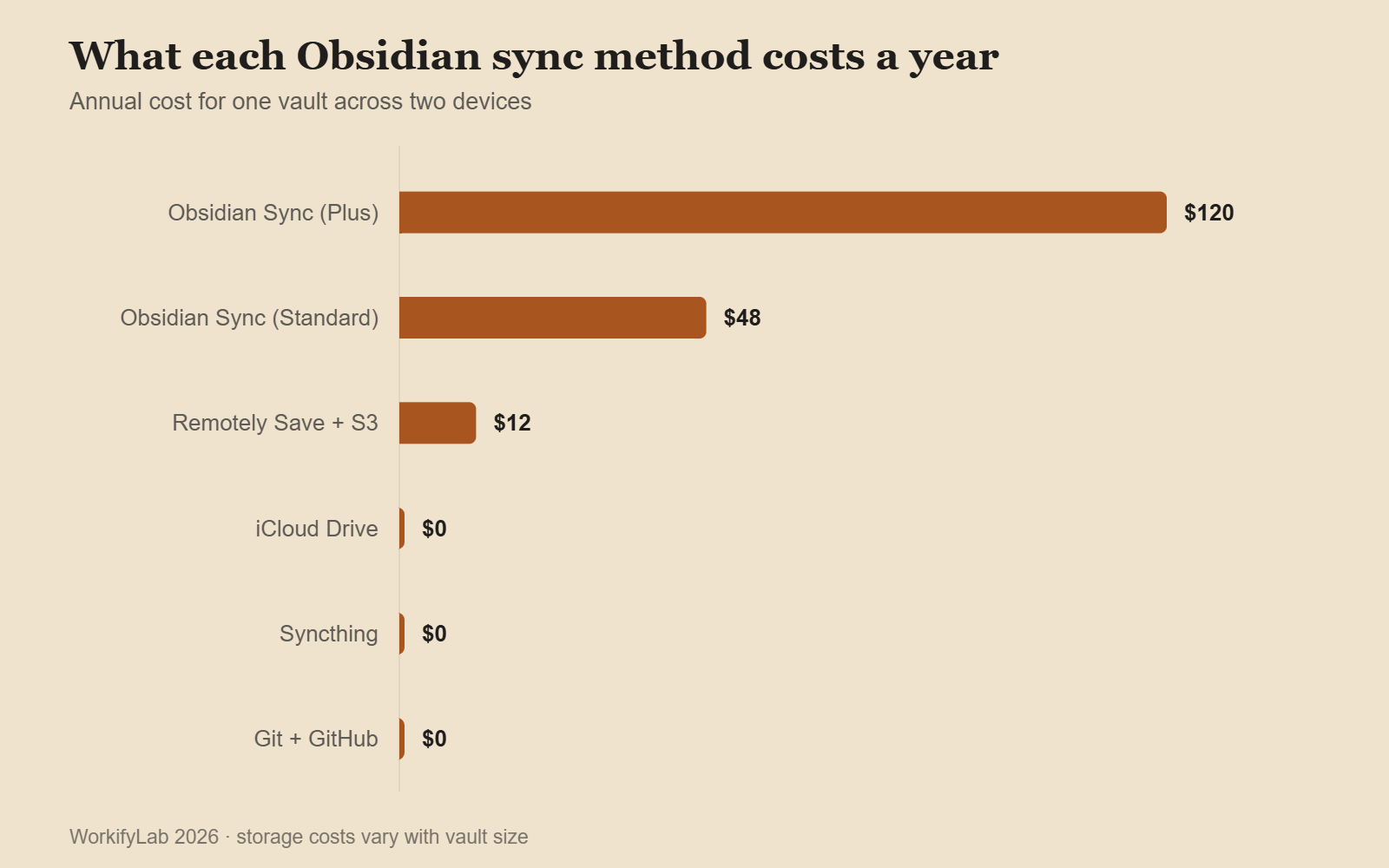

Git: the best option if you already use it
With the Obsidian Git plugin, your vault becomes a repository that commits on a timer and pushes to GitHub. What you get is not really sync — it is version control, which is strictly better. Every note has a full history, you can see exactly what changed and when, and a bad edit from three weeks ago is recoverable.
Two caveats. Mobile is workable but not pleasant — the plugin works on Android, and on iOS you are relying on a separate git client and a lot of patience. And large binary attachments bloat the repository quickly; if your vault holds hundreds of PDFs and images, keep them out or the clone gets slow.
For a text-first vault used mainly on one or two computers, this is the strongest free setup there is.
iCloud: easy, and quietly risky
On Apple devices, putting your vault in iCloud Drive takes about ninety seconds and works immediately. It is the most common free setup, and it is also the source of most “my notes disappeared” posts.
The failure mode is Optimise Mac Storage. When iCloud decides a file is not being used, it evicts the local copy and leaves a placeholder. Obsidian’s search and graph then behave as if those notes do not exist, because as far as the file system is concerned, they do not. Turn that setting off if your vault lives in iCloud.
The second problem is that editing the same note on two devices produces no warning at all — iCloud simply resolves it, and one version wins.

What Obsidian Sync actually buys you
Being honest about the paid option: it is the only method on this list that understands what a vault is. It syncs settings and plugins as a first-class thing rather than as files that happen to be in the folder, keeps per-file version history for a year on the higher tier, and works identically on iOS and Android with no third-party client.
| Tier | Price (annual) | Storage | Version history |
|---|---|---|---|
| Standard | ~$4/mo | 1 GB per vault | 1 month |
| Plus | ~$10/mo | 10 GB per vault | 12 months |
Whether that is worth $48 a year comes down to one question: how much is an hour of your time worth, and how many hours will you spend maintaining the free alternative? For a single-device user, none — stay free. For someone editing on a phone during a commute and a laptop at work, the paid tier usually wins on time alone.
Whichever you choose, do these three things
- Close the vault before switching devices. Ninety percent of conflicts come from two devices having the vault open at once.
- Keep a real backup. Sync is not backup — a deletion syncs perfectly to every device. A weekly zip to somewhere the sync cannot reach costs nothing.
- Exclude the workspace files. They change constantly and syncing them buys you nothing but conflicts.
Common questions
Can I use two methods at once?
You can, and it is a reliable way to corrupt a vault. Two syncers writing to the same folder will fight over the same files. Pick one.
Does Obsidian Sync encrypt my notes?
Yes — end-to-end, with a password only you hold. Lose that password and the notes are unrecoverable, which is the trade-off encryption always carries.
What about Google Drive?
Workable on desktop, painful on mobile, and Drive’s desktop client has a history of aggressive file locking that Obsidian does not enjoy. If you are already deep in Drive, the Remotely Save plugin is a better route than the native client. Drive also has its own quirks worth knowing — we covered several in Google Drive not syncing.
Is a vault safe on a network drive?
Not recommended. Obsidian expects fast local file access, and network latency causes odd behaviour in search and in plugins that watch the file system. Sync a local copy instead.
Leave a Reply