
These two apps have been copying each other for years, and the feature lists have converged to the point where a comparison table is almost useless. Both do tasks, subtasks, projects, labels, filters, natural language input and recurring dates.
The real difference is philosophical, and it shows up in the first week. Todoist wants to be a list you clear. TickTick wants to be a system you live in. One of those is right for you and the other will quietly annoy you every day.
What each costs
| Todoist | TickTick | |
|---|---|---|
| Free tier | 5 active projects, 5 collaborators | 9 lists, 99 tasks per list |
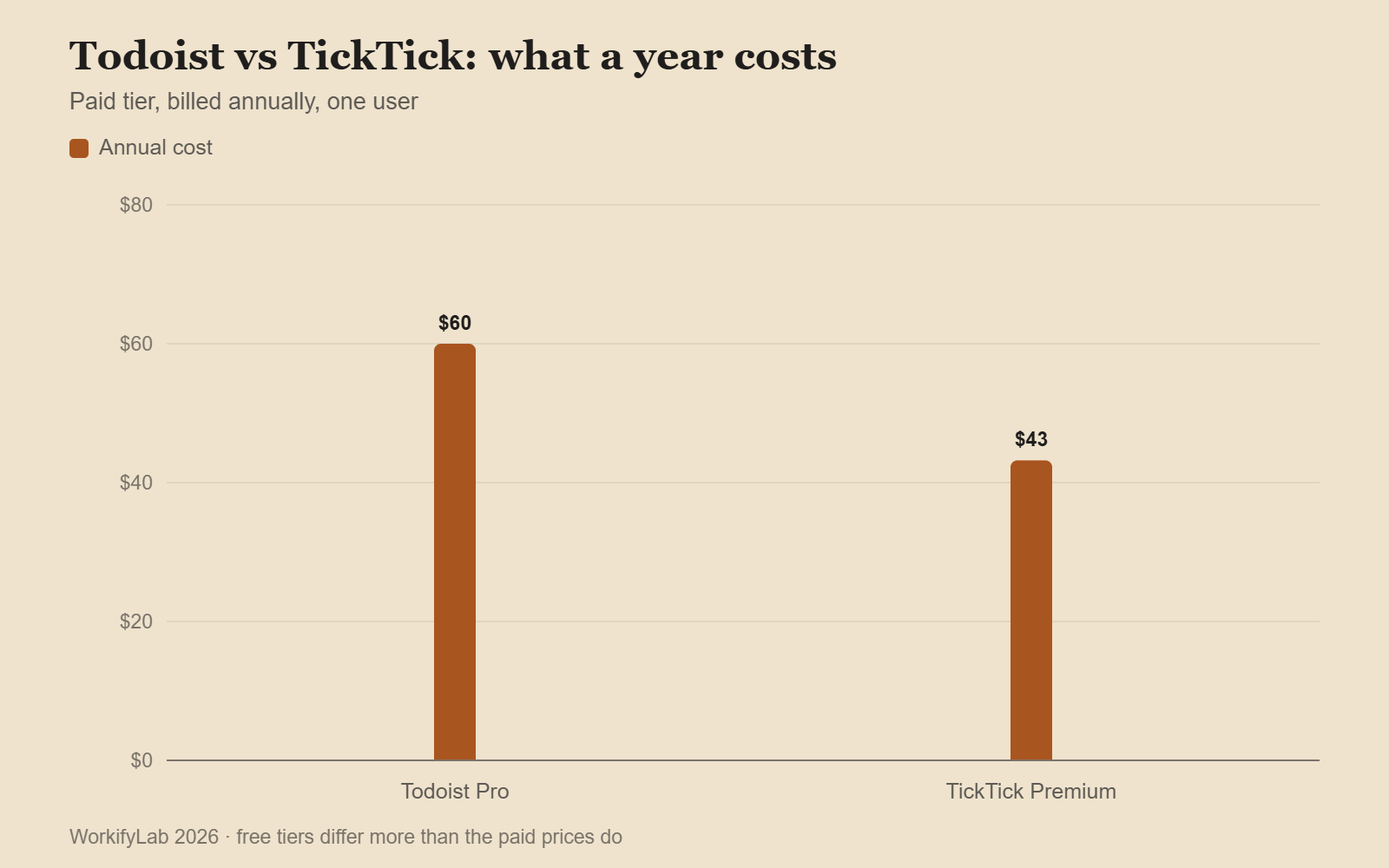
| Paid | ~$5/mo billed annually | ~$3.60/mo billed annually |
| Reminders on free | No | Yes |
| Calendar view | Paid | Paid |
| Built-in calendar | No — integrates | Yes — full month view |
| Pomodoro timer | No | Yes, built in |
| Habit tracker | No | Yes, built in |
| Notes / documents | Task descriptions only | Full notes alongside tasks |

The case for Todoist
Todoist does one thing and refuses to do anything else. There is no timer, no habit grid, no calendar of its own. It is a list, and it is the most polished list anyone has built.
Where that pays off:
- Quick capture is faster. Typing “email Sarah about the invoice tomorrow 9am p1 #work” produces exactly the task you meant, first time, every time. TickTick parses the same string well but not quite as reliably.
- The filter syntax is better. Queries like
(today | overdue) & #work & !@waitingcompose properly. If you build views rather than scroll lists, this is the single biggest difference between the two. - Integrations are deeper. Everything speaks to Todoist — the API is older, better documented and more widely supported.
- It never feels heavy. Open it, see the day, close it. There is nothing else in there to look at.
The case for TickTick
TickTick is the everything-app answer. Tasks, a real calendar, a Pomodoro timer, habits and notes, all under one subscription that costs less than Todoist’s.
- The calendar is genuinely useful. Seeing timed tasks and events in one month view removes the constant switching that Todoist users do between two apps.
- Reminders work on the free tier. Todoist gates these behind a subscription, which is a strange call for a task app.
- The timer is where you already are. Starting a Pomodoro on the task itself, rather than in a separate app, is a small thing that changes behaviour.
- Habits sit beside tasks. If “meditate daily” and “file the tax return” live in the same place, the daily one actually gets done.
The cost is clutter. There is more app to look at, more settings to tune, and more temptation to spend twenty minutes configuring instead of working. Some people find that motivating. Others find they stop opening it.

Where each one falls down
| Weakness | Todoist | TickTick |
|---|---|---|
| Free tier limits | Only 5 projects — restrictive fast | No reminders limit, but 99-task caps |
| Interface density | Sparse to the point of plain | Busy; several nested settings menus |
| Sub-task handling | Good, but nesting gets visually flat | Better indentation, worse filtering |
| Search | Fast and precise | Slower, fuzzier |
| Offline behaviour | Reliable | Occasional sync lag on mobile |
| Web app speed | Very fast | Noticeably heavier |
A simpler way to choose
Ask yourself what you did the last three times a task app stopped working for you.
If the answer is I stopped opening it because it felt like a chore, choose Todoist. Less surface area means fewer reasons to avoid it, and the friction of capture is the lowest of any app in this category.
If the answer is I kept having to check three other apps anyway, choose TickTick. Consolidation is its whole argument, and it makes it well.
And if you are not sure: both offer full trials, both export cleanly, and two weeks in each will settle it faster than any comparison article. The tool that survives is the one you still open on a bad Thursday.

Common questions
Can I migrate between them?
Yes, in both directions. TickTick imports Todoist backups directly. Going the other way, export TickTick to CSV and use Todoist’s template import. Sub-task nesting and recurring rules are the two things that usually need fixing by hand afterwards.
Which is better for teams?
Todoist, comfortably. Shared projects, comments and assignment are more mature, and the Business tier is built for it. TickTick’s sharing works but feels like a feature rather than a purpose.
Do either replace a note app?
TickTick’s notes are fine for short reference material and nothing more. Neither is a knowledge base — if that is what you are actually looking for, the comparison you want is Notion vs Obsidian instead.
What about the free tiers long term?
If you want the hours behind those tasks as well, here is Toggl vs Clockify vs Harvest.
For project work rather than personal tasks, here is what each free tier really allows in 2026.
TickTick’s free tier is usable indefinitely for a personal system. Todoist’s five-project cap becomes limiting within a month or two for most people, which is clearly deliberate.
Leave a Reply