
Google Drive gives you 15GB free. OneDrive gives you 5GB. Dropbox gives you 2GB. If you stop reading there you will pick Google, and for a lot of people that is the right answer — but it is the right answer for the wrong reason, because the free tiers are not measuring the same thing.
Google’s 15GB is shared across Drive, Gmail and Photos. Dropbox’s 2GB is 2GB of Dropbox. That difference matters more than the headline number, and it is the first of several places where these three are not really competing on the same axis.
The numbers, side by side
| Google Drive | OneDrive | Dropbox | |
|---|---|---|---|
| Free storage | 15GB (shared) | 5GB | 2GB |
| Entry paid tier | 100GB — $1.67/mo | 100GB — $1.67/mo | 2TB — $9.99/mo |
| Maximum personal | 30TB | 6TB | 3TB |
| Max file size | 5TB | 250GB | 2TB (paid) |
| Block-level sync | No | Yes | Yes |
| Zero-knowledge encryption | No | No | No |
| Password-protected shares | No | Yes | Yes |
Two things jump out. Google and OneDrive both start at $1.67 a month for 100GB, while Dropbox has no meaningful cheap tier — its real entry point is 2TB at $9.99. And Dropbox, the most expensive of the three, is also the one with the smallest maximum.
So on price per gigabyte this is not close. Google and OneDrive win, comprehensively. The question is what Dropbox is charging for.

Block-level sync is the thing you are actually paying for
This is the row in that table that most comparisons skip, and it is the one that changes how the software feels day to day.
Without block-level sync, editing a file re-uploads the whole file. Change one cell in a 200MB spreadsheet and Google Drive sends 200MB again. With block-level sync, only the changed chunks go up — so the same edit sends a few kilobytes.
If you work with documents, this is invisible. If you work with large files that change often — video projects, design files, databases, big datasets — it is the whole experience. It is the difference between saving and carrying on, and saving and waiting. Dropbox and OneDrive have it. Google Drive does not.
That single feature explains most of why Dropbox still charges five times what its competitors do and still has users who will not move. They are not paying for storage. They are paying for sync that does not make them wait.
What none of them do
None of the three offers zero-knowledge encryption. In plain terms: your files are encrypted, but the provider holds the keys, which means the provider can read your files, hand them to authorities on request, and lose them in a breach.
For most people, most of the time, that is an acceptable trade — it is what makes search, previews and web editing work at all. But it is worth being clear-eyed about it. If you are storing client contracts, medical records, legal documents or anything you have a duty of confidentiality over, none of these three is designed for that. You either add your own encryption before upload, or you use a provider built around zero-knowledge from the start.
The sharing gap is smaller but real. OneDrive and Dropbox let you put a password on a share link and set it to expire. Google Drive does not. If you send files to clients, that is a genuine functional difference, not a nice-to-have.
The free tiers, honestly
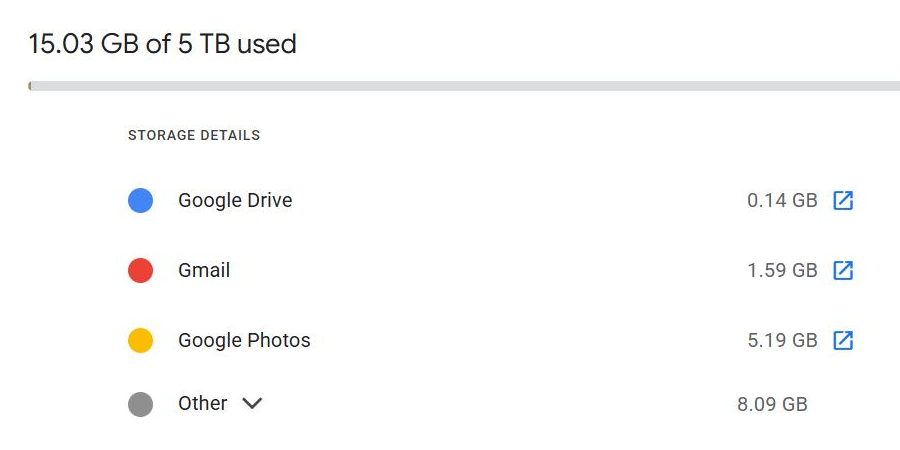
Google’s 15GB looks like the clear winner and mostly is — but it is shared with Gmail and Google Photos. In practice, for anyone who has had the same Gmail address for a decade, a large share of that 15GB is already gone before a single file reaches Drive. That is why so many people hit the ceiling without ever consciously uploading anything.
If that is where you are, the fix is usually not a bigger plan — it is finding what is actually eating the space, and it is rarely what people assume. We went through what to delete first when Google storage is full, including why deleting newsletters does almost nothing.
OneDrive’s 5GB is small, but if you have a Microsoft 365 subscription you likely already have 1TB included and may not have noticed. Check before you pay anyone for storage — a large number of people are paying Google for space they already own through Office.
Dropbox’s 2GB free tier is not a product. It is a demo.
Which one should you use
- You live in Gmail and Google Docs — Google Drive. The integration is the point, 100GB at $1.67 is cheap, and the missing features are ones you will not use.
- You already pay for Microsoft 365 — OneDrive. You have 1TB. Using anything else is paying twice.
- You work with big files that change constantly — Dropbox. Block-level sync is worth the premium, and this is the only case where it clearly is.
- You send files to clients — OneDrive or Dropbox, for password-protected and expiring links.
- You store confidential material — none of these three without adding your own encryption first.
The one recommendation that applies to everybody: none of these is a backup. Sync means a file you delete or corrupt on one machine gets deleted or corrupted everywhere, which is the opposite of what a backup does. Version history buys you a window to recover, but it is a window, not an archive. If the files matter, keep a real backup somewhere that does not sync.
The bottom line
On price, Google Drive and OneDrive are tied and Dropbox is not competitive. On sync behaviour, Dropbox and OneDrive are ahead and Google Drive is behind. On privacy, all three are the same and none of them is good.
Pick by which ecosystem you already live in, unless you move large files daily — in which case pay the Dropbox premium and stop thinking about it.
Storage is only one slice of the decision. If you are choosing the whole suite rather than just the drive, we compared Google Workspace against Microsoft 365 on the things that actually differ.
If you are choosing personal storage rather than a business suite, see the best cloud storage in 2026 — where version history and encryption matter more than price.
If Drive is already misbehaving for you, we have written up why Google Drive stops syncing and how to fix it and what the download quota error actually means.
Leave a Reply