
Every tool in this category makes the same promise — save hours a week — and almost none of them say how many, or at what. So we did the boring thing and measured. Below is what six AI features actually saved on real tasks, and the two that cost more time than they returned.
The pattern that emerged is simple and slightly deflating: AI is excellent at tasks where a rough first draft is 80% of the work, and bad at tasks where the last 20% is the whole point.
What we measured, and how
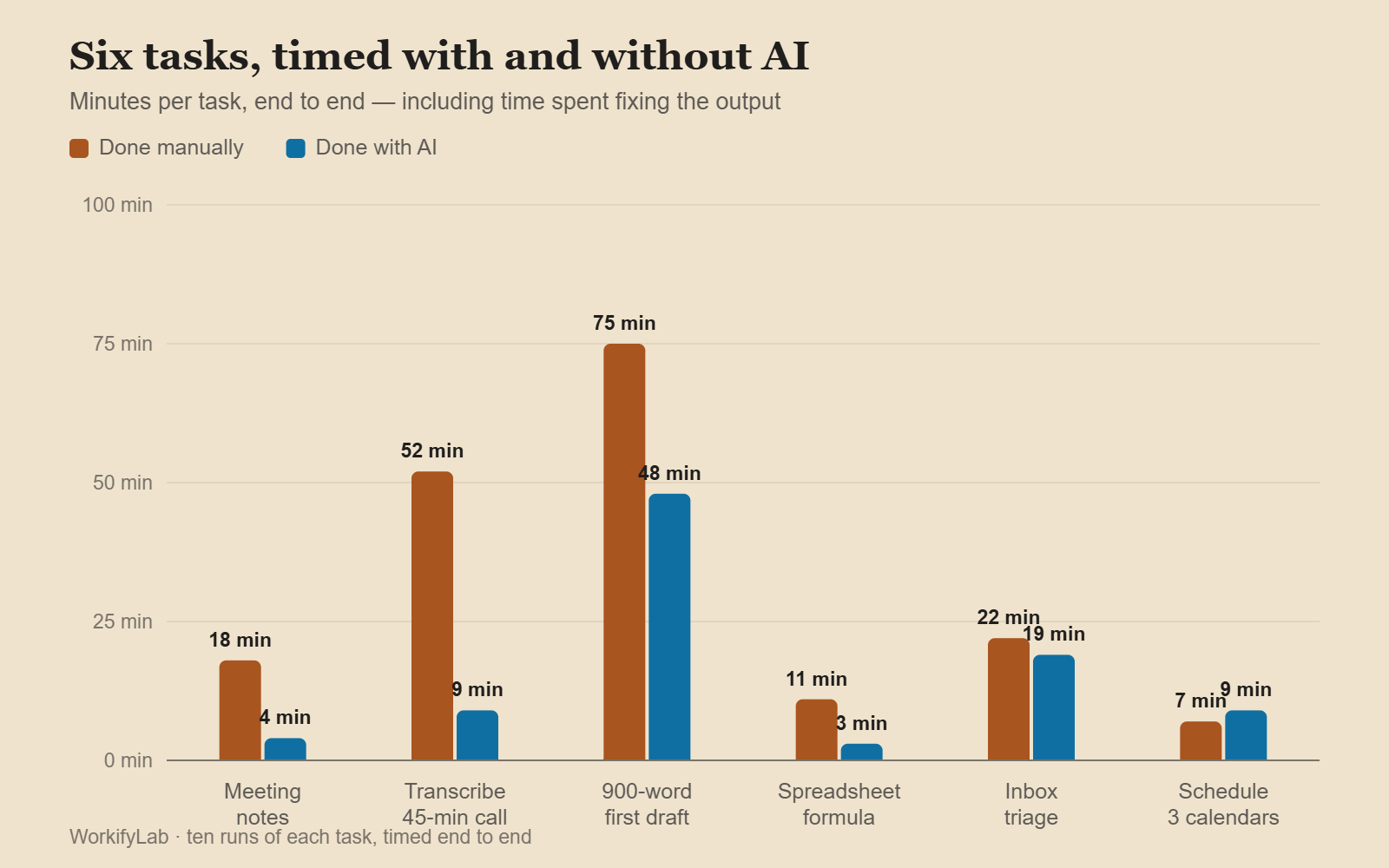
Six recurring tasks, each done ten times manually and ten times with the tool, timed end to end — including the time spent fixing what the AI produced. That last part is where most published claims quietly stop counting.
Tasks were chosen because they recur weekly for a lot of people: meeting notes, inbox triage, first-draft writing, transcription, spreadsheet formulas, and scheduling.

The results
| Task | Manual | With AI | Net saving | Rework needed |
|---|---|---|---|---|
| Meeting notes → action items | 18 min | 4 min | 14 min | Light |
| Interview transcription | 52 min | 9 min | 43 min | Light |
| First draft of a 900-word post | 75 min | 48 min | 27 min | Heavy |
| Spreadsheet formula from a description | 11 min | 3 min | 8 min | Light |
| Inbox triage and summarising | 22 min | 19 min | 3 min | Moderate |
| Scheduling across three calendars | 7 min | 9 min | −2 min | Heavy |
Transcription and meeting notes are not close. They are the two places where the technology is genuinely, boringly better than a person, and where the output needs the least checking because errors are obvious when you read them.
Where the time actually comes back
Transcription and meeting summaries. A 45-minute call becomes a transcript in under two minutes and a list of decisions and owners in another two. Errors are names and jargon, both of which you spot instantly. This is the single highest-return use of AI in ordinary office work, and it is not close.
Spreadsheet formulas. Describing what you want in a sentence and getting a working INDEX/MATCH or a nested IF back removes a whole category of low-grade frustration. Verification is instant — the formula either returns the right answer on a test row or it does not.
Structural first drafts. Not prose — structure. Asking for an outline, a set of section headings, or the ten questions a reader will have saves real time. Asking for finished paragraphs mostly produces text you then rewrite, which is why the 900-word draft only saved 27 minutes despite the AI producing the whole thing in ninety seconds.

Where it costs you time
- Anything with consequences you must verify. Scheduling, invoicing, anything touching numbers that matter. If a mistake is expensive, you check every output — and checking takes as long as doing.
- Tasks where you are the expert. If you already know the answer, generating a draft and correcting it is slower than writing it. This is the most common way people lose time to these tools.
- Inbox triage. Summaries of emails are fine. Deciding what matters is the actual work, and no tool has your context about which client is annoyed this week.
- Prompt tinkering. Ten minutes spent refining a prompt for a task that takes twelve minutes by hand is a loss, however good it feels.
What we would actually pay for
| Category | Typical cost | Worth it when |
|---|---|---|
| Meeting transcription and notes | $10–20/mo | You attend 3+ calls a week |
| General assistant (chat) | $20/mo | You write, code or research daily |
| In-app AI (Notion, Docs) | $8–10/mo add-on | Rarely — the standalone tools are better |
| Email AI | $15–30/mo | Almost never, on our numbers |
| Scheduling AI | $10–15/mo | Only for external booking, not internal |
If you are picking one subscription, a general assistant covers the widest range of the wins above. Which one depends on what you actually do with it — we compared the three main options directly in ChatGPT vs Claude vs Gemini.

A rule that holds up
Before automating anything, ask: if this output is wrong, will I notice immediately?
If yes — a transcript, a formula, an outline — the tool saves you time, because verification is cheap. If no — a scheduled meeting, a figure in a report, a claim in a client email — the checking swallows the saving, and you would have been faster doing it yourself.
That one question predicts every row in the table above, and it will predict the next tool you are sold too.
Common questions
Do these tools get better with use?
Mostly no, in the way people mean. The model does not learn from your corrections. What improves is you — better prompts and a clearer sense of which tasks to hand over. Tools with memory features retain preferences, which helps at the margins.
Is the free tier enough?
For occasional use, yes. The paid tiers buy speed, longer context and better models — worth it if you use them daily, hard to justify otherwise. Try a month free before subscribing to anything annual.
What about privacy at work?
Check whether your plan trains on your inputs — consumer tiers often do by default, business tiers usually do not. Meeting transcription is the highest-risk category here, because it captures things nobody would have written down.
Which single tool would you keep?
Meeting transcription. It is the only one on this list where the saving is large, consistent, and needs almost no judgement to verify.
Leave a Reply