For a couple of years the answer to “how much is Notion AI?” was simple: about $10 a member on top of whatever you were already paying. That is no longer true, and the change is bigger than the price.
The standalone Notion AI add-on was discontinued on 13 May 2025. Full Notion AI now lives on the Business plan — which means the way you buy it is by upgrading your entire workspace, for every member, whether or not they use AI.
What it actually costs now
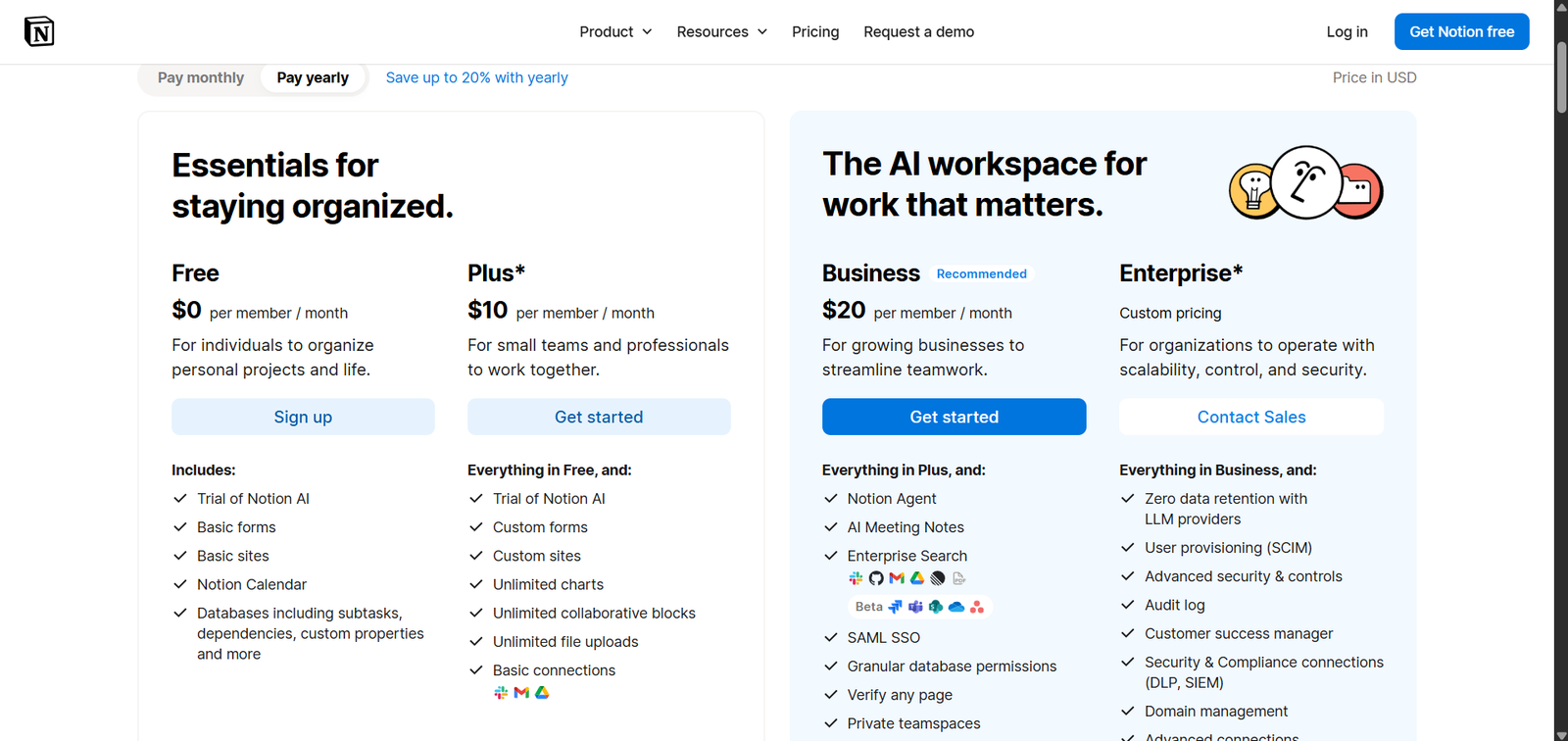
| Plan | Annual (per member) | Monthly (per member) | Notion AI |
|---|---|---|---|
| Free | $0 | $0 | Limited trial only |
| Plus | $10 | ~$12 | Limited trial only |
| Business | $20 | ~$24 | Included, full |
| Enterprise | Custom | Custom | Included, full |
Read that as a workspace bill rather than a per-seat price and the change is obvious. A five-person team on Plus pays $50 a month annually. To get AI, that team moves to Business: $100 a month. The AI did not cost $10 a head — it doubled the bill, and it did so for all five people even if one of them wanted it.
For a solo user the maths is gentler but the same shape: $10 becomes $20. You are paying an extra $120 a year for AI features, and also for a set of Business-plan capabilities you may have no use for.

The credits nobody mentions
Business includes Notion AI, and that phrasing does some work. Custom Agents — the automated, multi-step ones — are metered separately at $10 per 1,000 credits.
For ordinary use (summarising a page, drafting a paragraph, asking questions of your workspace) you will not meet this. If you start building agents that run on a schedule or process large volumes, you will — and it is a usage-based line item on top of a per-seat subscription, which is the kind of cost that arrives as a surprise rather than a decision.
Worth knowing before you build a workflow that depends on it.
What else the tiers change
| Free | Plus | Business | Enterprise | |
|---|---|---|---|---|
| File uploads | 5 MB | Unlimited | Unlimited | Unlimited |
| Page history | 7 days | 30 days | 90 days | Unlimited |
| Guests | 10 | Unlimited | Unlimited | Negotiable |
Two of these deserve flagging because they catch people out independently of AI.
The 5 MB upload limit on Free is small enough to break normal use. One phone photo can exceed it. If you plan to put anything visual in Notion, Free is not a plan you can stay on.
The 1,000-block cap returns the moment a workspace has two or more members. Solo users get unlimited blocks on Free; add one collaborator and the cap applies. This is the mechanism that converts most teams, and it arrives without warning in the middle of setting something up.
And monthly billing costs roughly 20% more than annual across every tier. If you are staying a year, pay annually; if you are unsure, the 20% is what you are paying for the option to leave.

Is it worth upgrading for?
The honest answer depends on a question that has nothing to do with the AI itself: would Business be worth it anyway?
Because the add-on is gone, you can no longer buy Notion AI in isolation, so “is Notion AI worth $10” is not a question you can act on. The real question is whether $20 per member is worth it for Business plus AI together.
- Probably yes if your team already keeps most of its knowledge in Notion. AI that can answer questions across your own workspace is a different product from a general chatbot, and that is the one thing here you cannot replicate with a separate tool.
- Probably not if you mainly want drafting and summarising. A standalone AI subscription costs about the same as the upgrade for one person, works on everything rather than only what is inside Notion, and does not require moving your whole team to a higher tier.
- Almost certainly not if one person on a five-person workspace wants it. You would be paying four extra upgrades to serve one user.
That middle case is the common one and it is worth being blunt about. If your use of AI is “help me write this paragraph”, the value is in the model, not in where the text box lives — and you can get that from any general assistant. We compared the main ones in ChatGPT vs Claude vs Gemini.
The bottom line
Notion AI is not a $10 add-on any more. It is a reason to be on the $20 Business plan, priced per member across your whole workspace, with Custom Agents metered separately at $10 per 1,000 credits.
Upgrade if the value is AI that knows your workspace. Do not upgrade if the value is generic writing help — that is available cheaper and works everywhere else too.
For the full tier-by-tier breakdown outside of AI, see which Notion plan you actually need. And if you are still deciding whether Notion is the right home for your notes at all, Notion vs Obsidian is the comparison to read first.
Leave a Reply