
AI website builders all demo the same way: describe your business, wait forty seconds, get a site. The demo is real. What the demo does not show is what happens in month six, when you need to change the pricing page and the tool has forgotten what it built.
That is the axis worth comparing on — not who generates the prettiest first draft, but what you own afterwards and how much it costs to change.
The three kinds, and why it matters
| Kind | What you get | Editing afterwards | If you leave |
|---|---|---|---|
| Hosted builder with AI generation | A site on their platform | Visual editor, easy | Site does not come with you |
| AI layer on an existing CMS | Pages inside WordPress etc. | Normal CMS editing | You keep everything |
| AI code generator | Actual HTML/React files | Requires a developer | You own the code |
Hosted builders are the easiest and the most locked in. Code generators give you the most freedom and demand the most skill. The CMS layer sits in between and is where most small businesses should probably be.

What the AI is genuinely good at
- Getting past the blank page. A generated first draft with real sections is far easier to react to than an empty canvas. Most people know what they dislike faster than what they want.
- Layout conventions. Hero, three benefits, social proof, pricing, FAQ, footer. The AI knows the pattern, and the pattern works.
- Filler that is not lorem ipsum. Placeholder copy shaped like your business helps you judge spacing and hierarchy properly.
- Responsive breakpoints. Generated layouts are usually mobile-correct out of the box, which used to be the fiddliest part.
What it is still bad at
- Knowing anything about your business. Generated copy is confident and generic, and it reads like every other site in your industry. It all has to be rewritten, and that is the actual work.
- Performance. Generated pages often ship heavy images and unused scripts. Check the page on a mobile connection before you celebrate.
- Accessibility. Contrast and heading order are frequently wrong. A quick automated audit catches most of it, and doing so is not optional if customers use screen readers.
- Consistency across pages. Generate five pages and you often get five slightly different button styles.
- Changes six months later. This is the big one. Regenerating a section often disturbs the rest, and the tool has no memory of your intent.

How to choose, in four questions
- Who edits this in a year? If the answer is “me, and I am not technical”, a hosted builder or a CMS layer. If it is “a developer”, generated code is fine.
- Does the site need to do anything? Bookings, a shop, memberships, a searchable directory. Hosted builders handle common cases; anything unusual will hit a wall.
- Can you export? Ask specifically: can I get my content out in a usable format, and does that include images and page structure or just text?
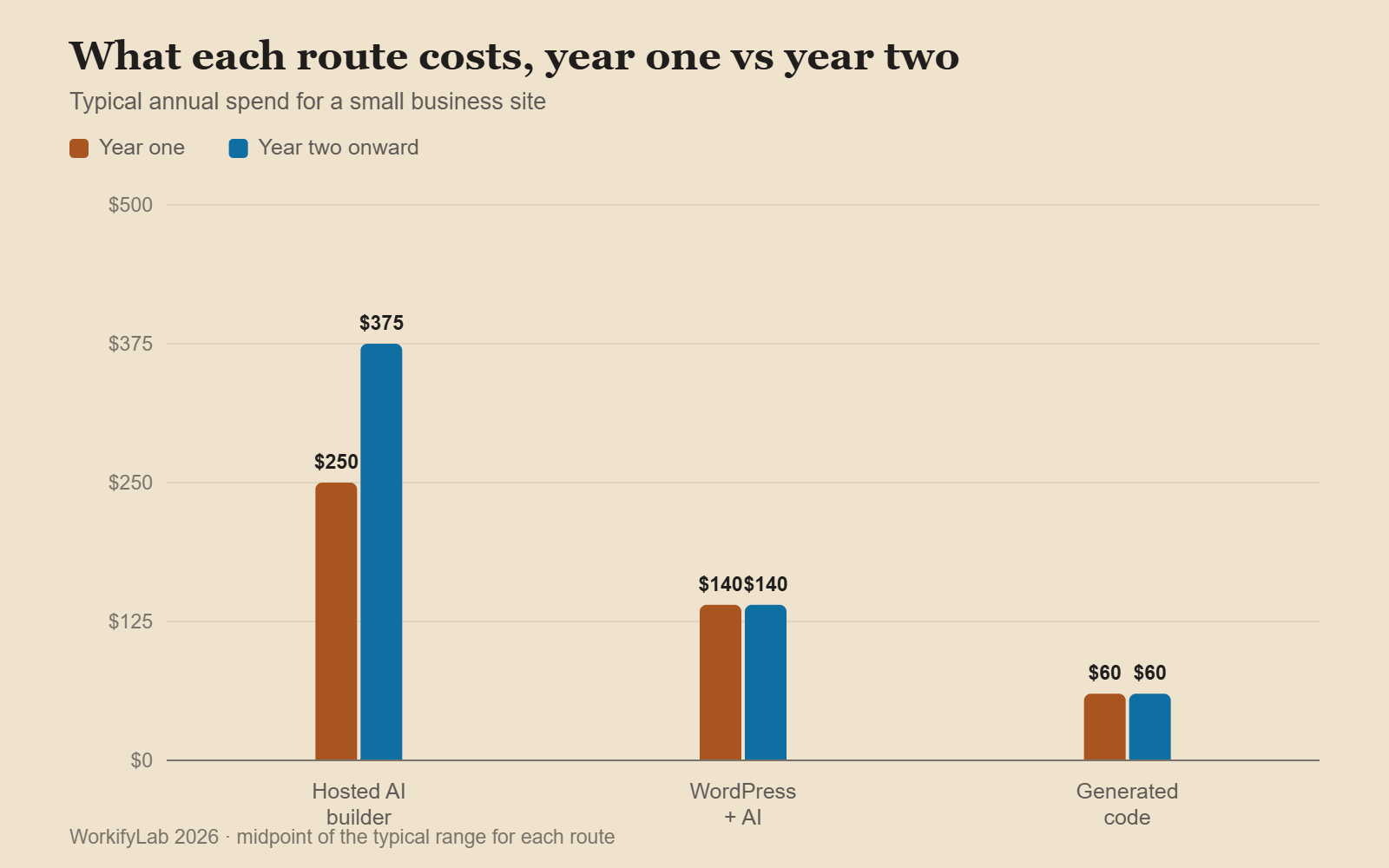
- What does it cost at renewal? Introductory pricing on hosted builders frequently doubles. Check year-two pricing before committing a domain to it.
The realistic cost picture
| Hosted AI builder | WordPress + AI | Generated code | |
|---|---|---|---|
| Year one | $150–350 | $80–200 | $0–120 hosting |
| Year two onward | $250–500 | $80–200 | $0–120 |
| Skill needed | None | Some | Developer |
| Time to first version | 1 hour | 3–6 hours | 2–8 hours |
| Time to a version you would show a client | 1–2 days | 2–4 days | 2–5 days |
That gap between “first version” and “version you would show someone” is where the marketing quietly stops. The AI produces the scaffolding in an hour. The writing, the photographs and the details still take the same time they always did.

Common questions
Will an AI-built site rank in search?
The build method is not the issue — the content is. A fast, well-structured site with pages that answer real questions ranks. A fast, well-structured site full of generic generated copy does not, because nothing on it is worth ranking.
Can I move a hosted site to WordPress later?
You can move the content, usually by hand. You cannot move the design. Budget for a rebuild, and keep your domain registered somewhere independent so at least the address comes with you.
Is a template a better bet?
Often, yes. A good template plus your own writing beats generated everything, and it is more predictable to edit. Use the AI for the copy outline, not the whole site.
What about images?
Every generated site ships with stock photography that looks like every other generated site. Replacing even five images with real photographs of your actual work does more for credibility than any layout change.
Leave a Reply